Free WordPress plugin · Meta Pixel + Conversions API
Fire-once funnel events for Meta Pixel.
On quote, finance and enrolment forms that keep every step on one URL, reloads, the back button and second tabs make most pixel setups count one conversion several times. Pixelonce lets each event say how often it may fire — and shows you why it did or didn't.
- Standard and custom events
- No limits on events, pages or pixels
- Consent first
WordPress 6.2+ · PHP 7.4+ · Get it on WordPress.org
- 1conversion reported per application — not 4
- 6how-often rules, from every time to once per visitor or product id
- 8consent tools and signals supported, before anything loads
- 0limits on events, pages or pixels in the free plugin
Works with
- WP Consent API
- IAB TCF
- Cookiebot
- Complianz
- CookieYes
- Borlabs Cookie
- Google Consent Mode v2
- Global Privacy Control
- Multi-step forms on one URL
- admin-ajax form plugins
- fetch / REST submits
- WooCommerce (template)
01 · The problem
One applicant. Four InitiateCheckout events.
Quote, finance, insurance and enrolment funnels keep five steps on one URL. To a pixel, a reload, the back button, a second tab and the next step all look the same.
So one application becomes several conversions. The ad platform optimises toward the wrong people, and every decision is made on inflated numbers.
- InitiateCheckoutstep 1 shown
- InitiateCheckoutreload
- InitiateCheckoutback from step 2
- InitiateCheckoutopened in a second tab
Nothing errors. Your cost per lead just looks better than it is.
02 · How it works
One visit, five steps, every event sent once.
Each event declares how often it may fire. Pixelonce remembers what was already sent for this page view, visit, session or visitor, so a repeat is stopped before it reaches the pixel.
- Step 1 · QuoteInitiateCheckout, once per session. A reload sends nothing new.
- Step 2 · Your detailsViewContent, once per visit.
- Step 3 · Loan termsCustomizeProduct, once per visit — the back button doesn't repeat it.
- Step 4 · Bank detailsAddPaymentInfo, once per visitor — not again in a second tab.
- Step 5 · SubmitLead, once per plan id, from the browser and the server under one event id.
- InitiateCheckout firedfired · step 1 · once per session
- InitiateCheckout suppressedsuppressed · reload · already sent this session
- ViewContent firedfired · step 2 · once per visit
- CustomizeProduct firedfired · step 3 · once per visit
- CustomizeProduct suppressedsuppressed · back button · already sent this visit
- AddPaymentInfo firedfired · step 4 · once per visitor
- AddPaymentInfo suppressedsuppressed · second tab · already sent for this visitor
- Lead firedfired · step 5 · plan car_finance · browser + server
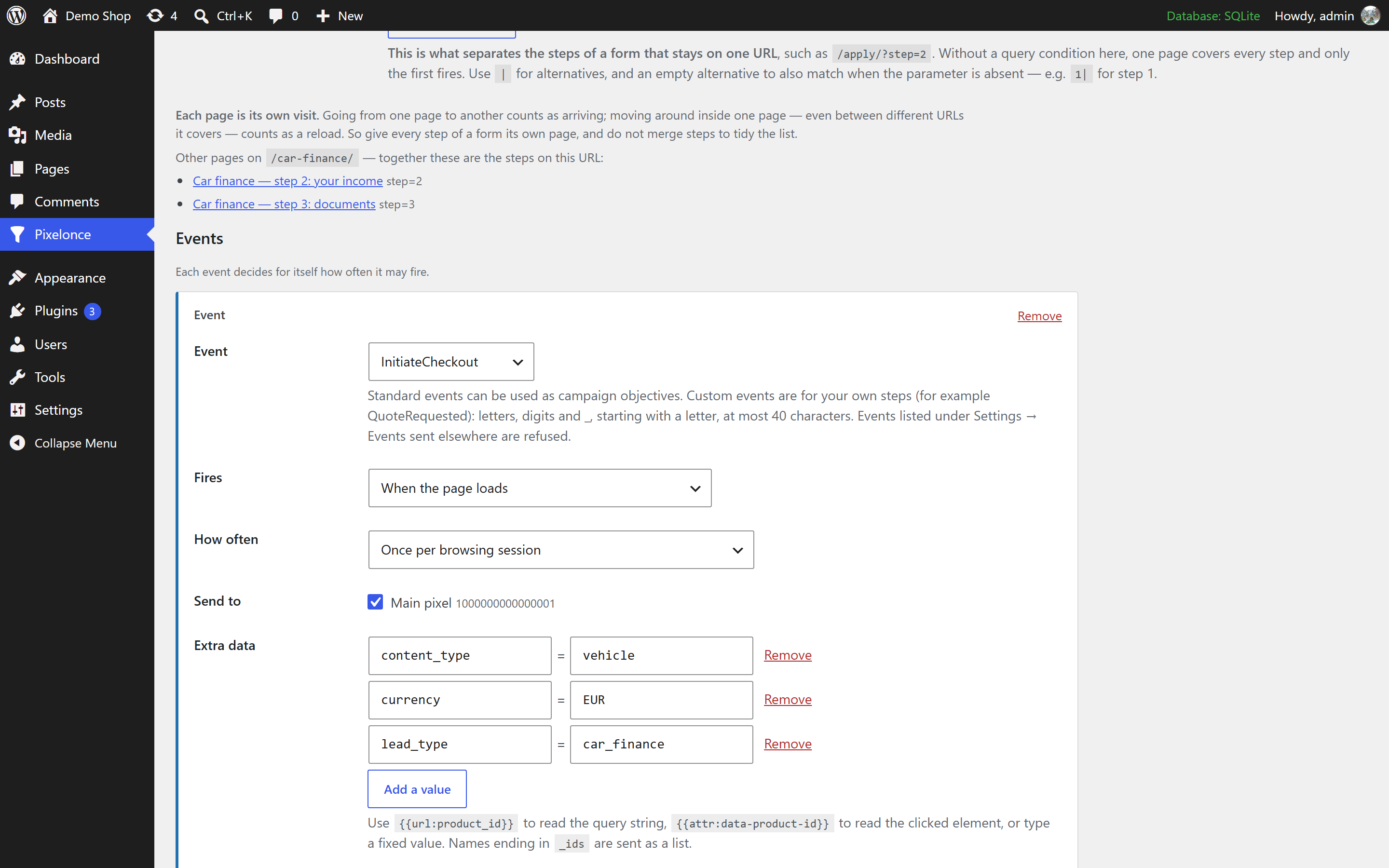
Events with all their details
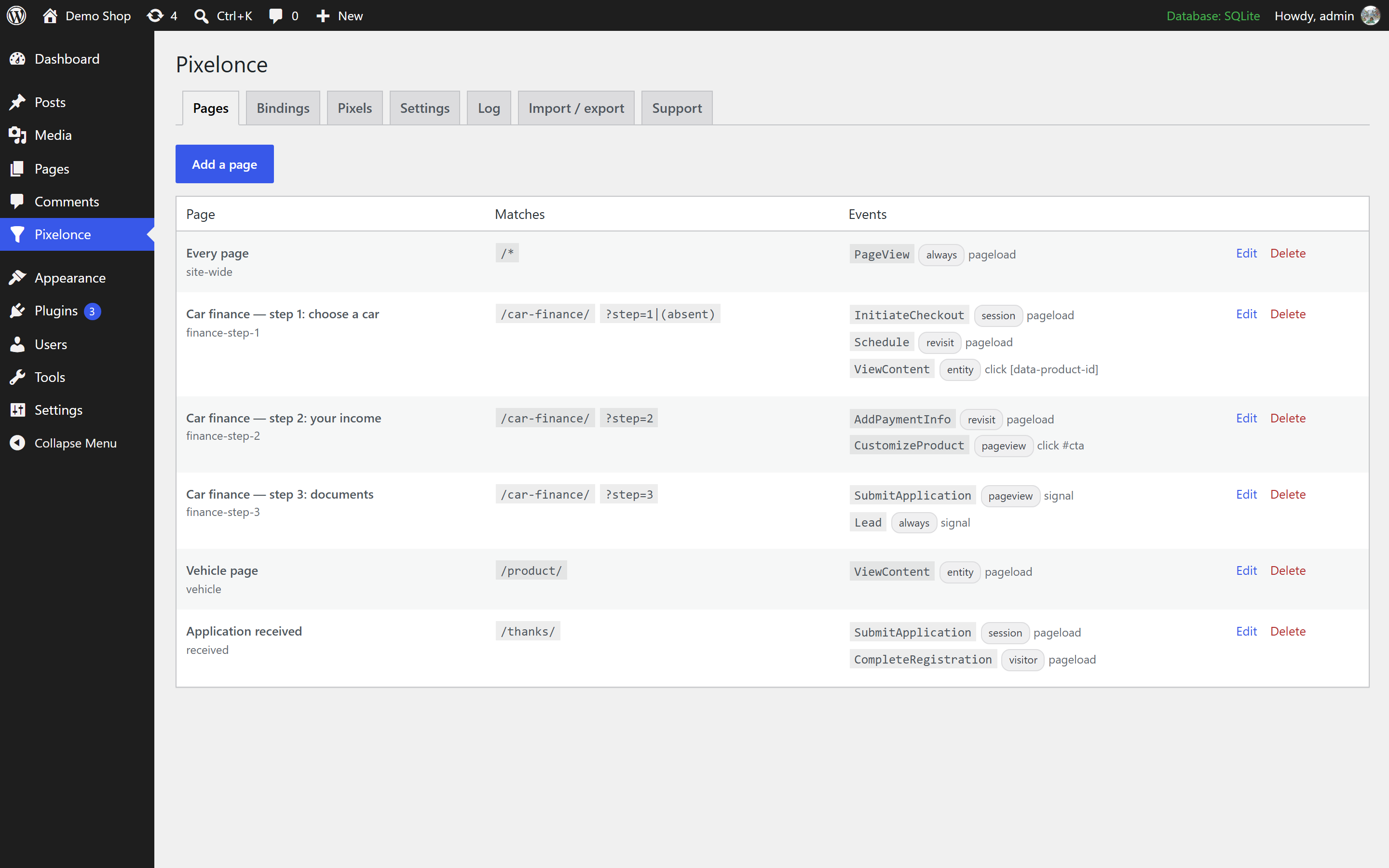
One event, its parameters, and both copies.
Add value, currency, content ids or your own fields to any event. Pixelonce sends the same parameters to the browser pixel and the server copy, under one event id. Pick an example:
In Pixelonce
Lead standard event
- Page
finance-step-3- How often
- once per session
- When
- background submit succeeded
| Parameter | Value |
|---|---|
value | 120 |
currency | EUR |
lead_type | car_finance |
step | 3 |
event id sc_7f3c91e14a2b
fbq('track', 'Lead', { value: 120, currency: 'EUR', lead_type: 'car_finance', step: 3}, { eventID: 'sc_7f3c91e14a2b' });same event id
{ "event_name": "Lead", "event_id": "sc_7f3c91e14a2b", "action_source": "website", "custom_data": { "value": 120, "currency": "EUR", "lead_type": "car_finance", "step": 3 }}Meta gets both copies with sc_7f3c91e14a2b and counts one Lead.
03 · Connected to Meta
Two copies, one event id, counted once.
When an event fires, Pixelonce sends it to the Meta Pixel in the browser and posts a copy to your own site, which forwards it to Meta's Conversions API under the same event id. Meta keeps one of the pair, so nothing is counted twice.
If an ad blocker stops the browser copy, the server copy still arrives. Nothing is sent before the visitor gives consent, and the browser stays the only place that decides whether an event fires.
- Your website, running Pixelonce, waits for consent.
- After consent, the browser sends the event to the Meta Pixel.
- At the same time your server sends a copy to the Conversions API under the same event id.
- Meta receives both copies, keeps one and counts one Lead.
04 · Consent
Nothing loads until the visitor says yes.
No pixel, no cookies and no server copy before consent. Pixelonce reads the WP Consent API, IAB TCF, and Cookiebot, Complianz, CookieYes and Borlabs Cookie, and can also set Google Consent Mode v2.
Events that happen before the visitor decides are held, then sent on a grant or dropped on a refusal — and the fire-once decision was already made when they happened, so nothing doubles up.
Held before consent
Sent to Meta after Accept
05 · Debug overlay
See why an event didn’t fire.
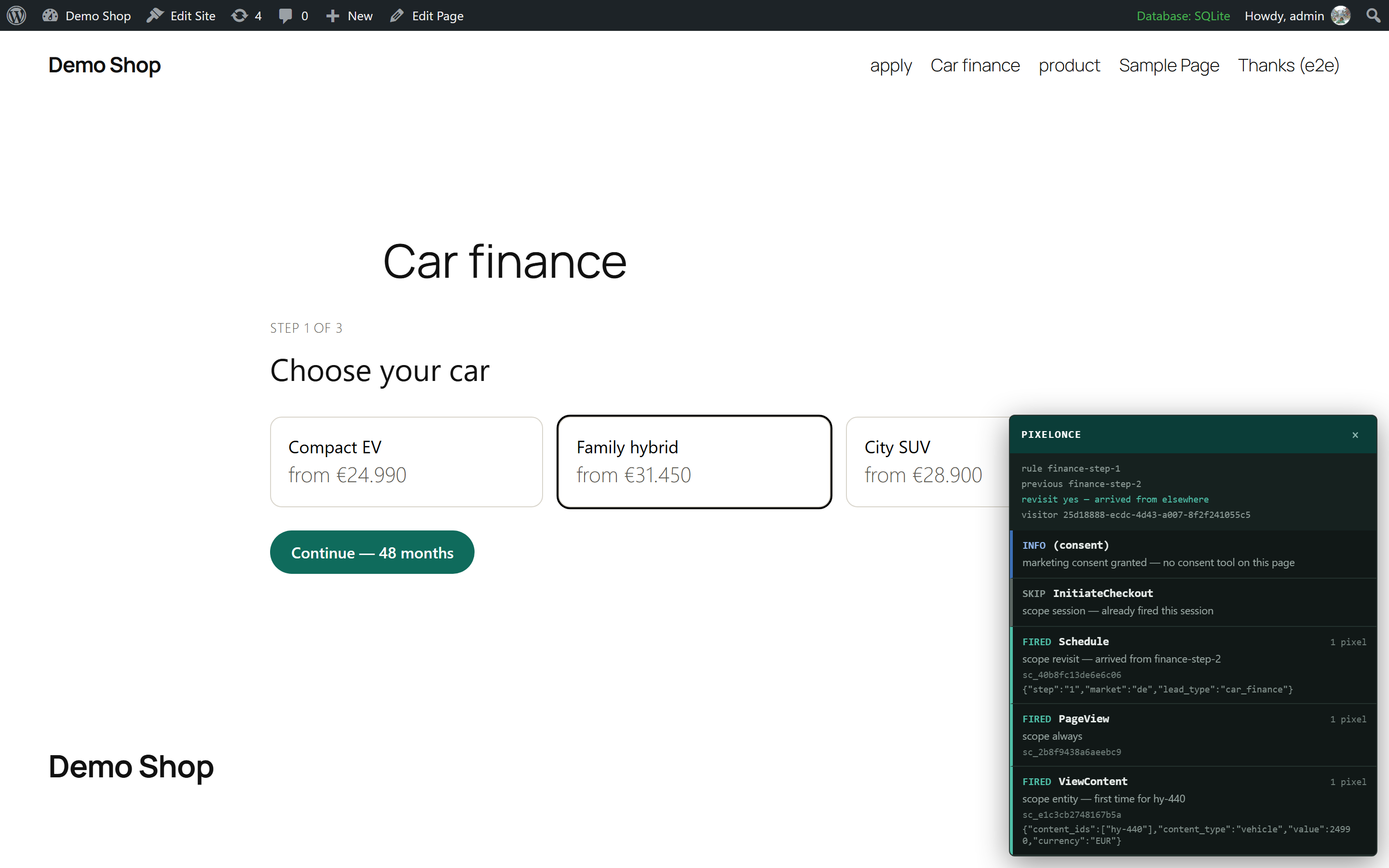
Add ?stepcount_debug=1 to any page. The overlay lists every event Pixelonce considered, whether it fired, and the exact reason when it didn't — so “is it tracking?” takes seconds, not an afternoon in Events Manager.
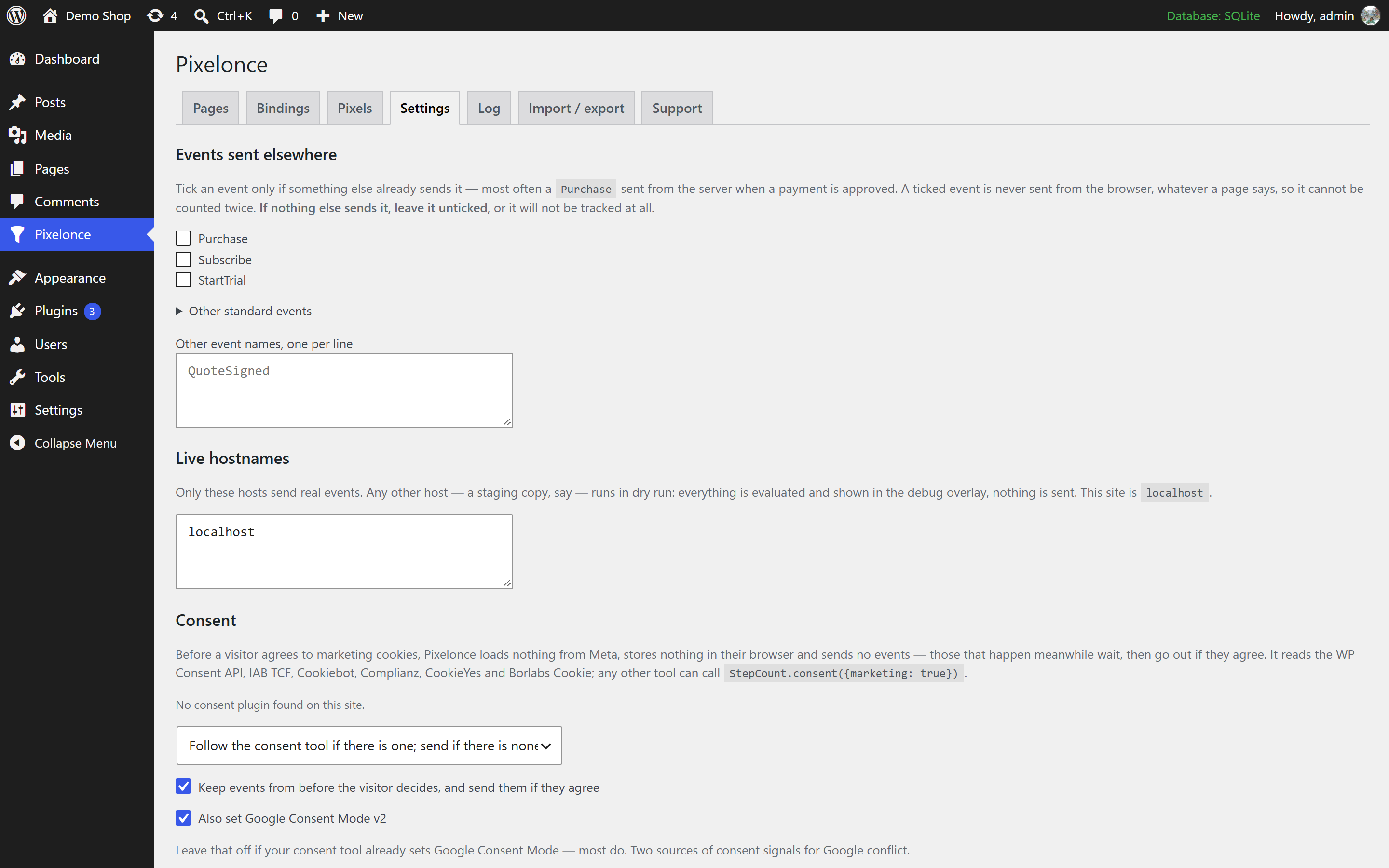
It opens for logged-in administrators on the live site and for anyone on staging, where events run in dry run and are never sent.
- PageView — fired
- InitiateCheckout — fired
- ViewContent — not firedsuppressed: reload or re-entry from the same rule (apply-step-2)
- InitiateCheckout — not firedsuppressed: already fired in this session
- Lead — fired
06 · How often
Every event gets a “how often”.
Pixelonce asks a second question for each event: not only which event, but how often may it fire, and keyed on what?
- Every time — fires on every view.
- Once per page view — the default for clicks and submits.
- Once per visit — a reload doesn't count; coming back from elsewhere does.
- Once per session or once per visitor.
- Once per thing — once per product, plan or vehicle id.
| How often | First arrival (car quote) | Reload | Leave and come back | Next day, car again | Next day, van quote |
|---|---|---|---|---|---|
Every timealways | ✓fires | ✓fires | ✓fires | ✓fires | ✓fires |
Once per visitrevisit | ✓fires | ✕suppressed: reload | ✓fires | ✓fires | ✓fires |
Once per sessionsession | ✓fires | ✕suppressed: same session | ✕suppressed: same session | ✓fires | ✓fires |
Once per thingentity | ✓fires | ✕suppressed: car already | ✕suppressed: car already | ✕suppressed: car already | ✓fires |
07 · Bindings
Counts the submit that worked — not the one that returned 200.
Most application forms submit in the background. A binding watches for a named admin-ajax action (or any endpoint by URL) and fires your event when it succeeds — or when a thank-you panel appears.
No theme edits, no tracking code pasted into templates that the next redesign quietly drops.
success:true.08 · Trigger health
Know when a theme update breaks tracking.
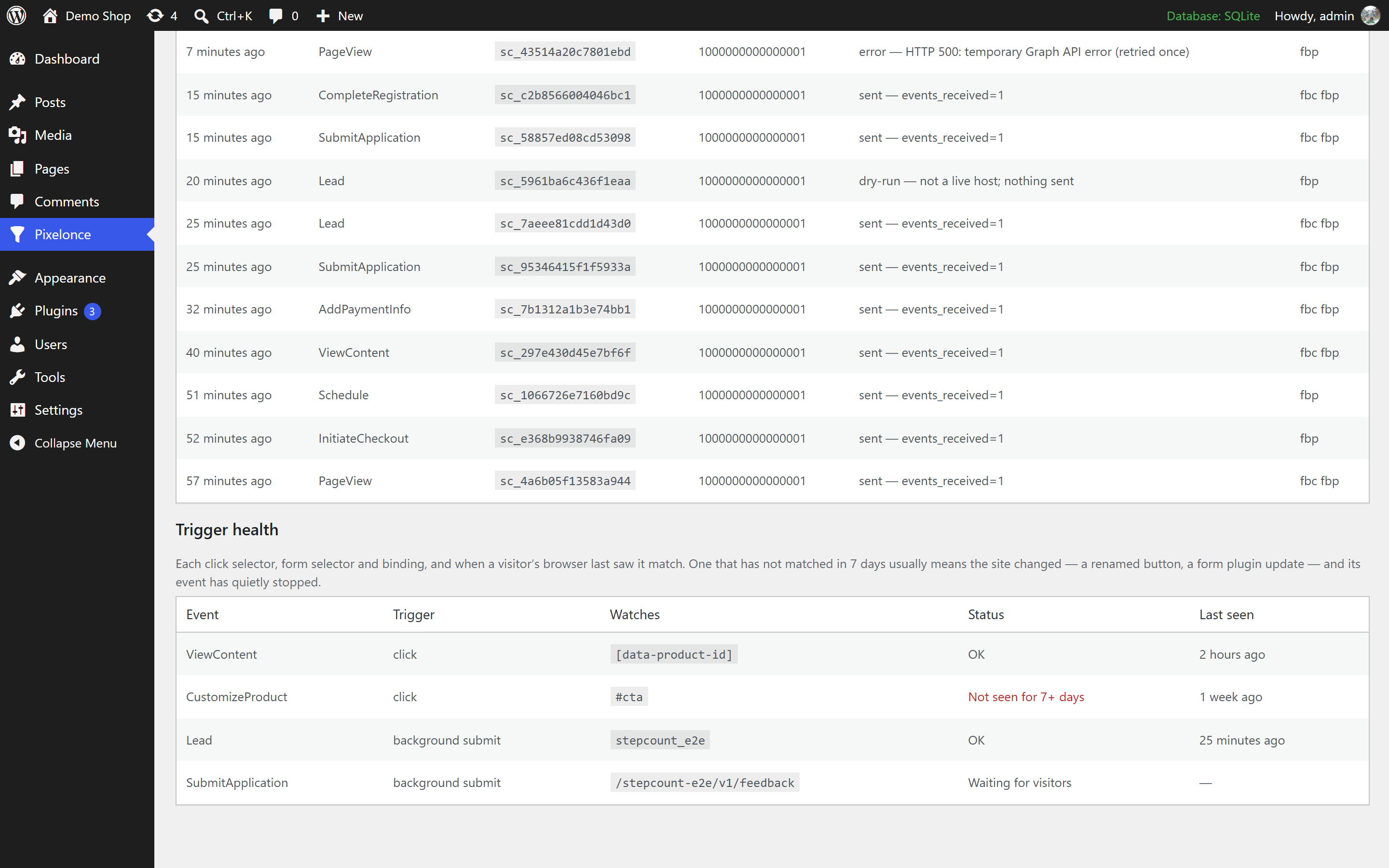
A renamed CSS class or a changed form action leaves an event that simply stops firing — and a dead trigger looks exactly like a page nobody used.
Pixelonce records when each click selector, submit selector and binding last matched, and flags the ones that went quiet. No personal data: a trigger key and a time.
| Trigger | Last matched |
|---|---|
ajax: submit_application | 3 minutes ago |
click: .btn-apply | stale · no match for 7 days |
09 · Setup wizard
A working funnel in about ten minutes.
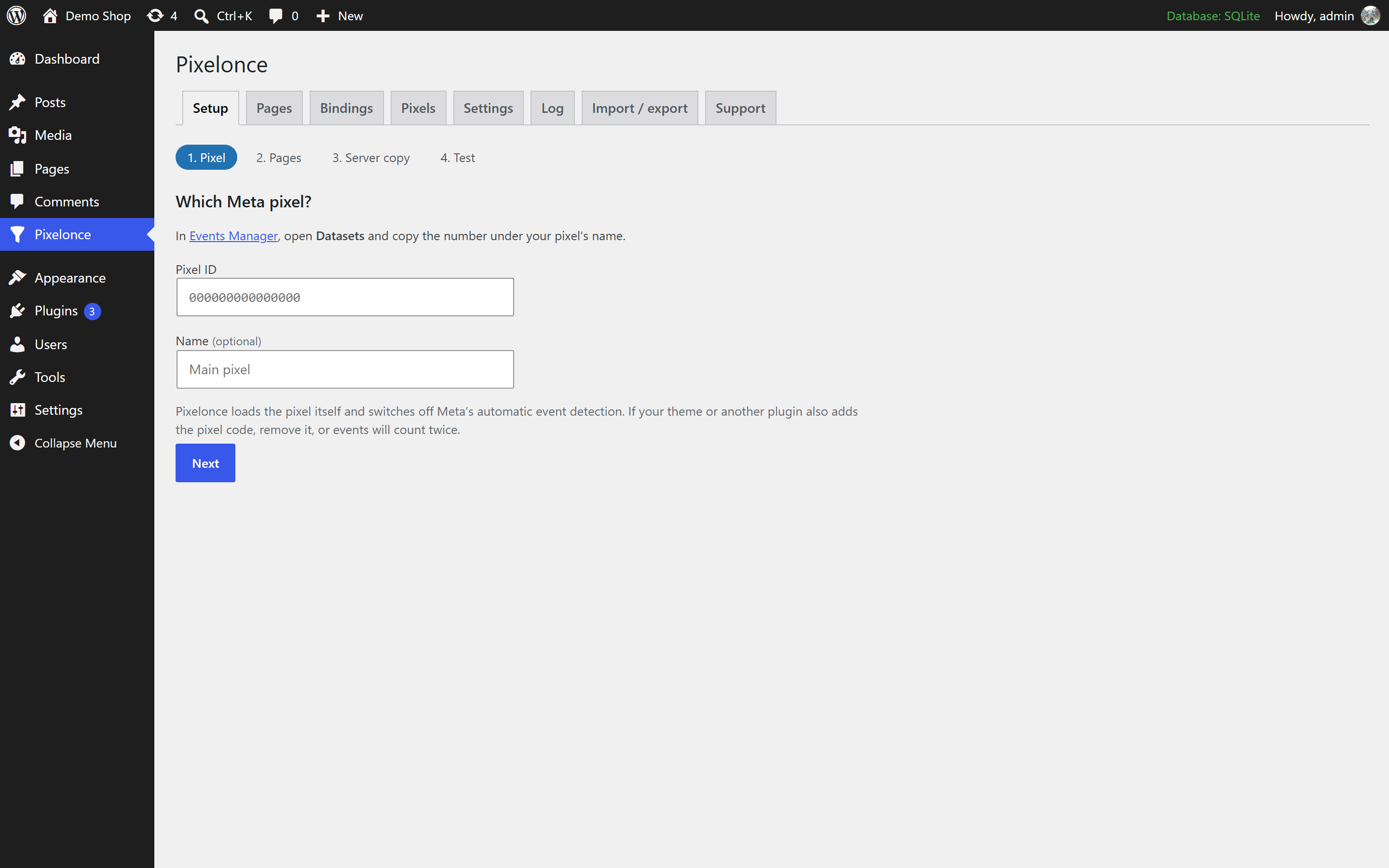
The first-run wizard is built for someone who has never seen Pixelonce: four steps, one question each, no docs required. Staging copies start in dry run, so you can rehearse safely.
- PixelPaste your pixel id. Pixelonce loads it and turns off automatic events.
- PagesDescribe each funnel step: a path plus optional query conditions.
- Server copyOptional: add a Conversions API token.
- TestWalk the funnel with the debug overlay open.
Inside WordPress
See it on a real funnel.
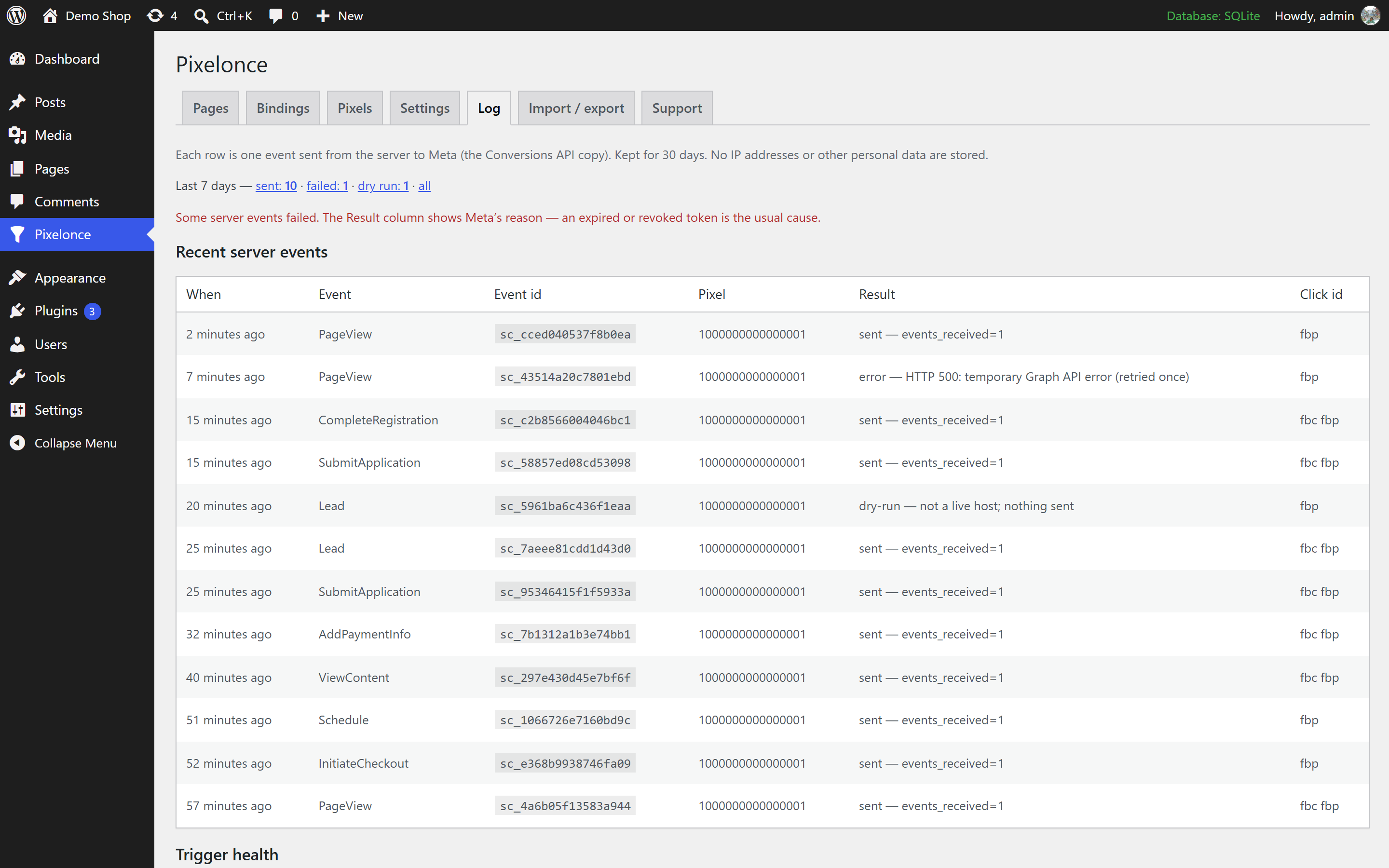
A car finance form in three steps, priced in euros. Click any screen to see it full size.
Free, all of it
Everything a funnel needs to report one event per step.
Once per step
Reloads, the back button and second tabs no longer add events. Each event says how often it may fire.
Conversions API copy
A server copy under the same event id. Still counts when an ad blocker stops the pixel; Meta keeps one.
Event parameters
Value, currency, content ids and your own parameters — fixed, or read from the URL or the clicked element.
Consent first
Nothing loads before consent. Reads your consent tool and can set Google Consent Mode v2.
Debug overlay
Every event on the page, fired or not, and the exact reason. Add ?stepcount_debug=1 (the plugin's original name).
Trigger health
Flags buttons and forms that stopped matching after a theme or form change.
Background-submit bindings
Count the admin-ajax or fetch submit that succeeded, not the one that only returned 200.
Page caches cleared
Change a setting and Pixelonce clears the page caches, so visitors get the new rules at once.
Setup wizard
Pixel, pages, server copy, test. One question per step, about ten minutes.
Templates
Starting points for application funnels and WooCommerce. Change anything after.
Event log
Every server send with its event id and Meta's answer. No IP addresses or visitor data.
Free now · Pro coming soon
Start free. Add GA4 and more ad platforms later.
Free
Free
Standard and custom Meta events, with no limits on events, pages or pixels. Conversions API, consent, debug overlay and the rest.
Download freePro coming soon
Pricing announced at launch
A separate add-on: Google Analytics 4, priority support, and more ad platforms:
- TikTok
- Google Ads
Who is Pixelonce for?
Sites whose most valuable conversion is an application, not a cart: quote, finance, insurance, loan, booking and enrolment forms, usually with several steps on one URL. It works in any country and any currency.
Is Pixelonce free?
Yes. Install it from the WordPress.org plugin directory (in your dashboard: Plugins → Add New, search "Pixelonce"), or download the zip from this site. It covers all of Meta's standard events and your own custom events, with no limits on events, pages or pixels: the fire-once rules, the Conversions API copy, consent handling, the debug overlay, trigger health, bindings, the setup wizard, templates and the event log.
What will Pro add, and what will it cost?
A separate add-on with Google Analytics 4 and the same fire-once engine for more ad platforms (TikTok, Google Ads, LinkedIn, Pinterest), plus priority support. The free plugin stays complete. Pricing is announced at launch. Join the waitlist to hear first.
Why would my events fire more than once?
Most tracking setups fire an event whenever a page or step is shown. On a multi-step form, a reload, the back button, a second tab or a step loaded in the background all look like a new arrival, so one application can report several InitiateCheckout or Lead events.
Does it work with Meta's Conversions API?
Yes. Each browser event can be copied to Meta's Conversions API from your server under the same event id, so Meta keeps one of the pair. If an ad blocker stops the browser copy, the server copy still counts. The browser stays the only place that decides whether an event fires.
What about consent?
Nothing loads before consent. Pixelonce reads WP Consent API, IAB TCF, Cookiebot, Complianz, CookieYes, Borlabs Cookie, honours Global Privacy Control, and can also set Google Consent Mode v2. You choose whether to follow a consent tool, always require consent, or switch consent handling off where it does not apply.
Do I need to edit my theme or form plugin?
No. Bindings fire events from background form submits that succeed, or when an element appears, without touching templates. You can also fire an event from your own code with StepCount.emit('Lead') — the plugin's JavaScript API keeps its original name.
Can I try it on a staging site first?
Yes. Any host that is not in your live-hostnames list runs in dry run: every event is checked and shown in the debug overlay, but nothing is sent.
Trust the numbers your ads optimise on.
One URL, five steps, one event each, and the reason whenever one does not fire.